

Thread Owner




- Joined
- Apr 10, 2026
- Threads
- 212
- Messages
- 230
- Reaction score
- 7,130
- Credits
- 13,384
- Telegram
- @dumendensexx
- İstatistikte sabit
- #1
How to View Hidden Content
Welcome to our community!
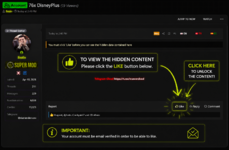
Some threads contain hidden content that is automatically unlocked after you Like the post.
Some threads contain hidden content that is automatically unlocked after you Like the post.
 How to Unlock Hidden Content
How to Unlock Hidden Content- Open the thread.
- Click the
 Like button below the post.
 - Refresh the page if necessary.
- The hidden content will now be visible.
 Frequently Asked Questions
Frequently Asked QuestionsDo I need to reply to the thread?
No. Simply clicking the
Like button is enough.
Do I need any special membership?
No. Unless the thread specifically states otherwise, any registered member can unlock the hidden content by clicking the
Like button.
I clicked Like, but I still can't see the content.
Please refresh the page (F5 or Ctrl + F5). If the content is still hidden, log out and log back in, then try again. If the issue persists, contact a moderator.
Photo;
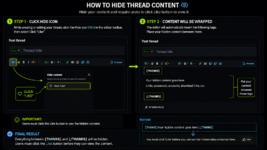
 How to Hide Your Thread Content
How to Hide Your Thread ContentWant to hide your content until users click the
Like button? Follow these simple steps.
Step 1
Step 1While creating or editing your thread, click the Hide button (
 icon) in the editor toolbar.
Then select:
Click "Like"
Step 2
Step 2The editor will automatically insert the following tags:
Now simply place the content you want to hide between these tags.
Final Result
Final ResultUsers must click the
Like button before they can view the hidden content.Photo;