


Announcement Hidden Content Guide (View & Create) (1 Viewer)

Thread Owner

Sezin

Super Moderator
Moderation Team 1K Likes Staff Member
Joined
Apr 10, 2026
Threads
212
Messages
230
Reaction score
7,133
Credits
13,384
Telegram
@dumendensexx

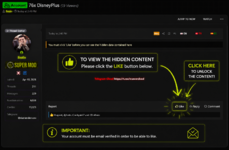
How to View Hidden Content​

Welcome to our community!

Some threads contain hidden content that is automatically unlocked after you Like the post.

📌 How to Unlock Hidden Content​

  1. Open the thread.​
  2. Click the 👍 Like button below the post.​
  3. Refresh the page if necessary.​
  4. The hidden content will now be visible.​


❓ Frequently Asked Questions​


Do I need to reply to the thread?​


No. Simply clicking the 👍 Like button is enough.

Do I need any special membership?​


No. Unless the thread specifically states otherwise, any registered member can unlock the hidden content by clicking the 👍 Like button.

I clicked Like, but I still can't see the content.​


Please refresh the page (F5 or Ctrl + F5). If the content is still hidden, log out and log back in, then try again. If the issue persists, contact a moderator.

Photo;
1783443497669.png


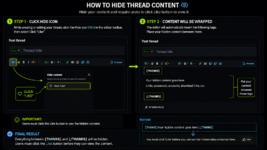
🇺🇸 How to Hide Your Thread Content​


Want to hide your content until users click the 👍 Like button? Follow these simple steps.

📌 Step 1​


While creating or editing your thread, click the Hide button (👁️‍🗨️ icon) in the editor toolbar.

Then select:
❤️ Click "Like"

📌 Step 2​


The editor will automatically insert the following tags:


Now simply place the content you want to hide between these tags.

📌 Final Result​


Users must click the 👍 Like button before they can view the hidden content.​


Photo;
1783444331167.png
 

How to View Hidden Content​

Welcome to our community!

Some threads contain hidden content that is automatically unlocked after you Like the post.

📌 How to Unlock Hidden Content​

  1. Open the thread.​
  2. Click the 👍 Like button below the post.​
  3. Refresh the page if necessary.​
  4. The hidden content will now be visible.​


❓ Frequently Asked Questions​


Do I need to reply to the thread?​


No. Simply clicking the 👍 Like button is enough.

Do I need any special membership?​


No. Unless the thread specifically states otherwise, any registered member can unlock the hidden content by clicking the 👍 Like button.

I clicked Like, but I still can't see the content.​


Please refresh the page (F5 or Ctrl + F5). If the content is still hidden, log out and log back in, then try again. If the issue persists, contact a moderator.

Photo;

View attachment 441


🇺🇸 How to Hide Your Thread Content​


Want to hide your content until users click the 👍 Like button? Follow these simple steps.

📌 Step 1​


While creating or editing your thread, click the Hide button (👁️‍🗨️ icon) in the editor toolbar.

Then select:


📌 Step 2​


The editor will automatically insert the following tags:


Now simply place the content you want to hide between these tags.

📌 Final Result​


Users must click the 👍 Like button before they can view the hidden content.​


Gg
 

How to View Hidden Content​

Welcome to our community!

Some threads contain hidden content that is automatically unlocked after you Like the post.

📌 How to Unlock Hidden Content​

  1. Open the thread.​
  2. Click the 👍 Like button below the post.​
  3. Refresh the page if necessary.​
  4. The hidden content will now be visible.​


❓ Frequently Asked Questions​


Do I need to reply to the thread?​


No. Simply clicking the 👍 Like button is enough.

Do I need any special membership?​


No. Unless the thread specifically states otherwise, any registered member can unlock the hidden content by clicking the 👍 Like button.

I clicked Like, but I still can't see the content.​


Please refresh the page (F5 or Ctrl + F5). If the content is still hidden, log out and log back in, then try again. If the issue persists, contact a moderator.

Photo;

View attachment 441


🇺🇸 How to Hide Your Thread Content​


Want to hide your content until users click the 👍 Like button? Follow these simple steps.

📌 Step 1​


While creating or editing your thread, click the Hide button (👁️‍🗨️ icon) in the editor toolbar.

Then select:


📌 Step 2​


The editor will automatically insert the following tags:


Now simply place the content you want to hide between these tags.

📌 Final Result​


Users must click the 👍 Like button before they can view the hidden content.​


aight
 

How to View Hidden Content​

Welcome to our community!

Some threads contain hidden content that is automatically unlocked after you Like the post.

📌 How to Unlock Hidden Content​

  1. Open the thread.​
  2. Click the 👍 Like button below the post.​
  3. Refresh the page if necessary.​
  4. The hidden content will now be visible.​


❓ Frequently Asked Questions​


Do I need to reply to the thread?​


No. Simply clicking the 👍 Like button is enough.

Do I need any special membership?​


No. Unless the thread specifically states otherwise, any registered member can unlock the hidden content by clicking the 👍 Like button.

I clicked Like, but I still can't see the content.​


Please refresh the page (F5 or Ctrl + F5). If the content is still hidden, log out and log back in, then try again. If the issue persists, contact a moderator.

Photo;

View attachment 441


🇺🇸 How to Hide Your Thread Content​


Want to hide your content until users click the 👍 Like button? Follow these simple steps.

📌 Step 1​


While creating or editing your thread, click the Hide button (👁️‍🗨️ icon) in the editor toolbar.

Then select:


📌 Step 2​


The editor will automatically insert the following tags:


Now simply place the content you want to hide between these tags.

📌 Final Result​


Users must click the 👍 Like button before they can view the hidden content.​


ok
 

Users who are viewing this thread

Back
Top