

Thread Owner

-
Vitrin konusu
- #1
Hello, dear CrackWeb members, I’m back with a new feature
You can now add a YouTube video to your profile page! Whether it's your favorite song, a video you love, or anything else — it will appear directly on your profile for everyone to see.
How to add:
1. First, copy the link of the YouTube video you want to add :
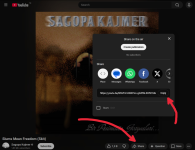
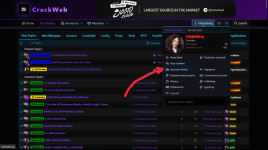
2. Then go to the personal details page on your profile :
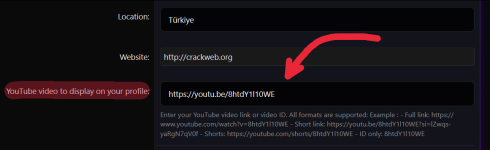
3. Scroll down the page a little, find the ‘YouTube video to display on your profile’ section, and paste the link you copied there :
That’s all there is to it—save the page, and your profile now looks much more vibrant and stylish.
Go on, add your favourite song to your profile right now and become part of the community. I hope you enjoy the forum.
1. First, copy the link of the YouTube video you want to add :
2. Then go to the personal details page on your profile :
3. Scroll down the page a little, find the ‘YouTube video to display on your profile’ section, and paste the link you copied there :
That’s all there is to it—save the page, and your profile now looks much more vibrant and stylish.
Go on, add your favourite song to your profile right now and become part of the community. I hope you enjoy the forum.


