

Thread Owner

Hydra_x001
Developer
================================================================================
HYDRA PROXY SCRAPER v2.0
================================================================================

================================================================================
DOWNLOAD LINK:
================================================================================
Just press START and you are good to go, PLEASE Read the manual inside the EXE to use the features.
If your system detects any kind of malware, Please remember to search this on the internet since it build using python:
HYDRA PROXY SCRAPER v2.0
================================================================================
================================================================================
DOWNLOAD LINK:
================================================================================
Just press START and you are good to go, PLEASE Read the manual inside the EXE to use the features.
If your system detects any kind of malware, Please remember to search this on the internet since it build using python:
"Virus warning when using PyInstaller"
Download all my resources LINK: CLICK-ME
================================================================================
WHAT IS HYDRA PROXY SCRAPER?
================================================================================
Hydra Proxy Scraper is a free, open-source Windows/Linux/macOS desktop
application that automatically collects thousands of free proxies from 144
public sources, verifies each one using real protocol-level handshakes, and
delivers a clean list of working proxies sorted by speed.
Unlike most free proxy tools that simply check if a TCP port is open (which
causes massive false-positives), Hydra uses three different validation engines:
HTTP proxies → Makes a real HTTP request THROUGH the proxy
SOCKS4 proxies → Performs the actual SOCKS4 handshake protocol
SOCKS5 proxies → Performs the actual SOCKS5 handshake protocol
This means every proxy in your output list is CONFIRMED working — not just
"port is open."
Who is this for?
- Web scrapers who need rotating IP pools
- Developers testing geo-restricted APIs
- Gamers looking for low-latency proxies
- Privacy enthusiasts wanting anonymous browsing
- Security researchers and penetration testers
- Anyone who needs free, working proxies fast
================================================================================
KEY FEATURES
================================================================================
SCRAPING
--------
+ 144 live sources: 61 HTTP, 39 SOCKS4, 44 SOCKS5
+ Sources include: ProxyScrape v2/v3/v4 API, OpenProxyList API,
proxy-list.download API, jsDelivr CDN mirrors, GitHub Pages hosts,
and 30+ actively maintained GitHub repositories
+ All sources scraped concurrently (configurable up to 500 threads)
+ Automatic deduplication — no wasted validation cycles
+ HTTP/2 support for faster scraping
+ Smart regex extracts IPs from any format (HTML, JSON, plain text)
VALIDATION (the important part)
---------------------------------
+ HTTP proxies: validated via real HTTP request to ip-api.com
→ Gets country code as a bonus — zero extra cost
+ SOCKS4 proxies: native SOCKS4 handshake to 1.1.1.1:80
→ Sends CONNECT packet, checks 0x5A (granted) response byte
→ No false positives from simple port-open checks
+ SOCKS5 proxies: native SOCKS5 two-step handshake to 1.1.1.1:80
→ Auth negotiation (no-auth) + CONNECT, checks 0x00 (success) byte
+ TCP mode available as fast alternative (lower accuracy, higher speed)
+ Configurable timeout per proxy (2–30 seconds)
+ Up to 500 concurrent validation threads
LATENCY FILTERING
-----------------
+ Gaming — keeps only proxies ≤ 50ms
+ Streaming/VoIP — keeps only proxies ≤ 150ms
+ General Browse — keeps only proxies ≤ 300ms
+ Geo-Unblocking — keeps only proxies ≤ 500ms
+ Web Scraping — keeps only proxies ≤ 3000ms
+ All — no filter, keep everything alive
GUI
---
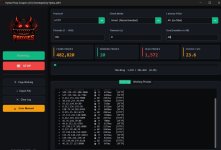
+ Dark theme, modern customtkinter interface
+ Real-time stats: Found / Working / Dead / Checks-per-second
+ Live progress bar with percentage
+ Two-tab output: "Live Log" (detailed) + "Working Proxies" (clean list)
+ Country flag emoji + ISO code for every HTTP proxy found
+ Copy all working proxies to clipboard in one click
+ Export to custom .txt file via Save dialog
+ Clear log button
OUTPUT
------
+ alive/http.txt — verified working HTTP proxies
+ alive/socks4.txt — verified working SOCKS4 proxies
+ alive/socks5.txt — verified working SOCKS5 proxies
+ Files written incrementally — never empty if you stop early
+ Final file sorted by latency (fastest proxy first)
+ Goal setting — stop automatically after N working proxies found
================================================================================
QUICK START (Get proxies in 60 seconds)
================================================================================
Default settings explained:
---------------------------
Threads: 150 → 150 concurrent validation connections
Timeout: 8s → each proxy gets 8 seconds to respond
Goal: All → collect all working proxies found
Mode: Smart → use protocol-appropriate validation
Latency: All → no speed filter, keep all working proxies
================================================================================
CHECK MODES EXPLAINED
================================================================================
SMART MODE (default, recommended)
------------------------------------
For HTTP proxies:
1. Opens a new connection to the proxy server
2. Sends an HTTP GET request to http://ip-api.com/json/
3. ip-api.com is a free geo-IP service that returns JSON
4. The proxy forwards your request and returns the response
5. If status_code==200 and json["status"]=="success":
→ Proxy is ALIVE
→ Records latency from connection start to response end
→ Extracts country code (e.g. "US", "DE", "JP")
Why this works:
ip-api.com sees the proxy's IP, not yours.
If the proxy is dead/filtered/fake: request times out or errors.
No false positives — only proxies that actually route traffic pass.
For SOCKS4 proxies:
1. Opens TCP connection to proxy_ip:proxy_port
2. Sends SOCKS4 CONNECT request packet (9 bytes):
04 01 00 50 01 01 01 01 00
│ │ └─┘ └──────────┘ └── NULL-terminated user ID
│ │ └── Destination port: 80 (big-endian)
│ └── CMD: 0x01 = CONNECT
└── VER: 0x04 = SOCKS version 4
Destination: 1.1.1.1 (Cloudflare — universally reachable)
3. Reads 8-byte response from proxy
4. Checks response[1]:
0x5A (90) = REQUEST GRANTED → proxy is ALIVE
0x5B (91) = REQUEST REJECTED → proxy is DEAD
timeout/error → proxy is DEAD
Why this is better than TCP-only:
TCP-open just means the port accepts connections.
A webserver on port 80 would pass a TCP test but is NOT a SOCKS4 proxy.
The SOCKS4 handshake proves the server actually speaks SOCKS4 protocol.
For SOCKS5 proxies:
Step 1 — Authentication negotiation:
Send: 05 01 00
│ │ └── Method: 0x00 = no authentication required
│ └── Number of methods: 1
└── SOCKS version: 5
Receive: 05 00 (server accepts no-auth)
If server returns 0xFF: auth required → mark as dead
Step 2 — CONNECT request:
Send: 05 01 00 01 01 01 01 01 00 50
│ │ │ │ └──────────┘ └─┘
│ │ │ │ 1.1.1.1 port 80
│ │ │ └── ATYP: 0x01 = IPv4 address
│ │ └── RSV: 0x00 (reserved)
│ └── CMD: 0x01 = CONNECT
└── VER: 0x05
Receive: Response[1] == 0x00 = succeeded → proxy is ALIVE
TCP MODE (fast alternative)
----------------------------
Simply opens a TCP socket to ip:port and measures response time.
If the connection succeeds within the timeout: proxy counted as alive.
Pros: 3–5x faster than Smart mode
Cons: Any open port passes (HTTP servers, databases, etc.)
Expect 40–60% of "working" proxies to actually be non-proxies
Recommended for: Quick rough scans, very large batches, pre-filtering
Attachments

Last edited by a moderator: